Slotexo Mobile Casino: Browser Experience & App Status
 Available in US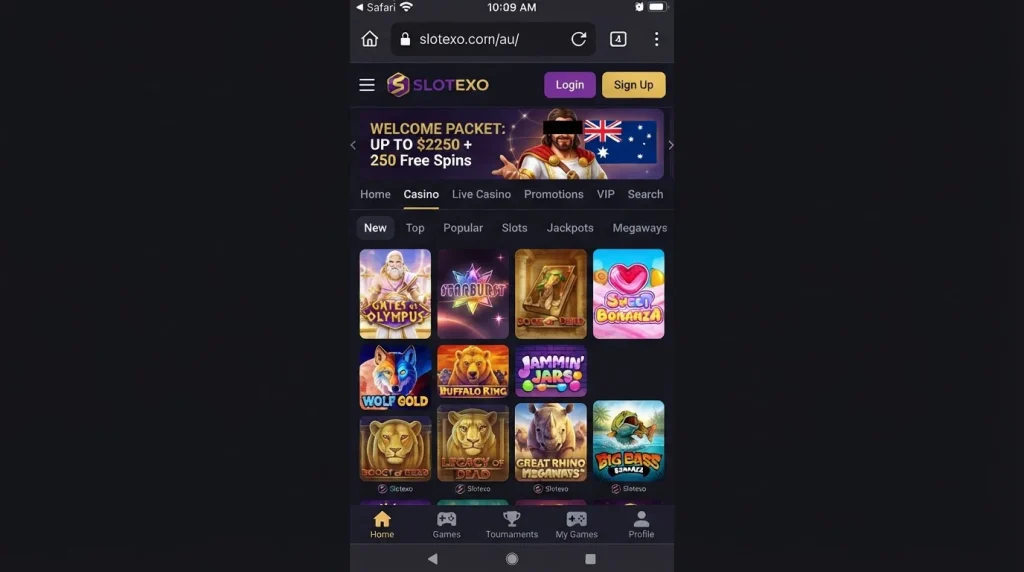
Slotexo supports mobile-browser play on smartphones and tablets. That is the verified mobile route for Australian readers: open the site in a modern phone browser, sign in or register, browse casino categories and use the same account rather than looking for a separate download. A dedicated Slotexo iOS or Android store app is not currently verified, so the mobile website should not be labelled an “app” and no App Store or Google Play release should be assumed without direct store evidence.
The distinction matters. A responsive casino website can look and behave much like an installed app, and a browser can often place a shortcut on the home screen, but neither feature proves that native software exists. The current AU site itself exposes casino, live-casino, promotions and support navigation and even a “Create Shortcut” option. For most practical tasks, the useful question is therefore not “Is there an app?” but “Can the mobile site handle the things I need without forcing a desktop session?”
Table of Contents
- Native app versus mobile website: what is actually verified?
- What you can do from the mobile browser
- A practical four-task mobile check
- Browsing the casino lobby on a smaller screen
- Registration and account access from mobile
- Payments on mobile: visibility matters more than icons
- Home-screen shortcut: useful, but still not a native app
- Mobile security and session habits
- Who is the mobile-browser route best for?
- Mobile checklist before using Slotexo regularly
- What Slotexo mobile access actually provides
- Slotexo Games: Pokies, Providers, Tables & Casino Categories
Native app versus mobile website: what is actually verified?
There are three different products that casino reviews often blur together. A native app is software distributed through an app store or another documented installation channel. A progressive-web-style experience is still a website but can use browser features to feel more app-like. A simple home-screen shortcut is just a saved launcher that opens the website. Current Slotexo information supports the mobile website and a shortcut-style route. It does not currently support a categorical claim that a dedicated native iOS or Android app exists.
This is not a cosmetic wording issue. A store listing would give readers a concrete publisher identity, version history, platform requirements, update dates and a distribution channel that can be checked independently. Without that evidence, calling the site an app would add facts that have not been verified. The appropriate status is therefore straightforward: mobile-browser use is verified; native-app availability remains unverified.
What you can do from the mobile browser
The current Australia-facing site exposes the main casino navigation in a form intended for browser use on phones and tablets. Its game area includes ordinary casino categories and a live-casino route, while account actions such as login and registration remain part of the web interface. The site also presents promotions and access to support. That covers the core tasks most players expect to perform from a phone without a separate desktop-only process.
Slotexo’s current games pages show large browseable category sets, including slots and live games. The point for mobile users is not the headline size of the catalogue but whether the interface lets them narrow a large library without endless scrolling. Category tabs, provider filters, “Top”, “New”, “Popular” and live-game groupings are therefore more important on a small screen than they are on desktop. A phone user should test whether those controls remain easy to tap and whether returning from a game preserves the place in the lobby.
For deeper catalogue detail, the separate Slotexo games section covers the main game families and provider information. The focus remains on using those sections from a mobile device rather than repeating the entire game inventory.
A practical four-task mobile check
A mobile casino can look polished on its home page and still be awkward when the user reaches a real task. A better practical test is to assess the journey in four parts: browse, play, cashier and support. These checks avoid invented speed scores or battery claims and focus on observable usability.
| Task | What to check on a phone | Why it matters |
|---|---|---|
| Browse | Category controls, search/filter visibility, readable game cards and easy return to the lobby | A large catalogue is only useful if it can be narrowed quickly on a small screen. |
| Play | Game loading, orientation changes, clear controls and a reliable way back to the casino lobby | Live tables and some game interfaces use landscape space differently from ordinary portrait browsing. |
| Cashier | Readable payment labels, deposit fields, account currency and confirmation screens | Financial steps should not depend on tiny text or hidden fields. Exact withdrawal rules are covered separately. |
| Support | Visible live-chat entry, ability to keep context while navigating and readable help content | Support becomes more valuable when a user is troubleshooting an account or payment issue from the same device. |
The site’s current 24/7 live-chat availability is especially relevant to mobile use because a phone user can reach support without switching to a separate email process. That does not guarantee instant resolution of every issue, but it means the support channel itself is available around the clock.
Browsing the casino lobby on a smaller screen
Slotexo has both slots and live casino content, and those two sections create different mobile demands. Slots are generally selected from dense visual grids, where filtering and category navigation do most of the work. Live casino pages add table names, game types and sometimes changing table information, so the screen can become busier. On a phone, the useful test is whether a player can identify the game family first and inspect an individual table second rather than having to decode several pieces of information at once.
The live lobby is also where portrait and landscape transitions become more noticeable. Browsing may be comfortable in portrait mode, while a streamed dealer game may make better use of landscape orientation. The correct expectation is not that every title behaves identically on every handset. Game providers control much of the actual game client, and browser, screen size and device differences can affect presentation. The sensible check is whether the Slotexo shell makes it easy to enter and exit those provider-controlled game experiences.
Do not treat one successful title as proof that every game works identically on every browser. If a particular game matters to you, test that title in demo mode when available before relying on it as part of your regular mobile setup.
Registration and account access from mobile
The AU site presents login and registration entry points in its browser interface, so account access is part of the mobile-web journey. Registration itself deserves separate scrutiny because an operator-side sign-up route does not answer the regulatory question for Australians. The dedicated Slotexo registration and KYC section distinguishes account access from Australian regulatory status and covers identity checks in the appropriate context.
From a usability perspective, the mobile registration screen should be judged on ordinary form quality: readable labels, sensible keyboard behaviour, clear error messages and enough space to review what was entered before submitting. Do not infer that a country is accepted simply because a generic register button is visible. Country selection and eligibility can be controlled later in a flow, and those details should be checked fresh when they are material.
Payments on mobile: visibility matters more than icons
Slotexo supports AUD and has verified payment evidence covered in the separate payments review. On mobile, the main concern is whether the cashier clearly identifies the account currency, payment route and amount before confirmation. A familiar logo alone is not enough to understand whether that method is available for deposits, withdrawals, both directions or a particular account.
Mobile cashier views can also age quickly because logged-in payment menus may change by account context. Exact payment limits are not repeated here, and every method should not be assumed to appear on every handset. For the verified payment picture, including which common Australian method has not been confirmed, use the site’s payment guide rather than treating the mobile layout as a separate source of financial rules.
Home-screen shortcut: useful, but still not a native app
The current Slotexo site includes a “Create Shortcut” item in its general information navigation. A shortcut can be convenient for repeat visits because it places an icon on the home screen and reduces the steps needed to reopen the site. It can also make the experience feel app-like because the user starts from an icon rather than typing a URL.
That convenience should not be confused with native distribution. A shortcut normally opens web content through the browser environment and depends on the website remaining available. It does not establish an Apple or Google store presence, and it does not establish native push features, offline capability, store-managed updates or device-level integrations. Those would require their own evidence.
Should I add the shortcut?
If you regularly use the site in a mobile browser, a shortcut can reduce navigation friction. Before adding one, verify that you are on the intended current domain and understand that the shortcut is a route to the website, not proof of an officially distributed native app.
Mobile security and session habits
Convenience on a phone creates a few practical risks that have nothing to do with casino marketing. A saved browser session can expose an account if the device itself is shared or poorly secured. Treat the phone lock, browser password storage and account password as part of the same security chain. Avoid leaving an authenticated casino tab open on a device other people can access.
Payment and identity-verification steps deserve particular care on small screens. Check that uploaded documents are the intended files before submission and that payment details have not been altered by autofill. If a support conversation asks for information, use the site’s verified support channel rather than moving sensitive account material into an unrelated messaging service.
These are general device-hygiene points, not claims about a special Slotexo security feature. The goal is to distinguish what the website provides from what the user must manage on the phone itself.
Who is the mobile-browser route best for?
The browser route suits users who want one account experience across phone, tablet and desktop without maintaining a separate installation. It is also the clearest option for readers who do not want to rely on an unverified app claim. Because the casino, live-casino and support areas are accessible through the web experience, the absence of verified native-store evidence does not mean mobile access is absent.
However, users who specifically require a native application should treat that requirement as unresolved until they can see a direct official App Store or Google Play listing. Likewise, users with an older handset, unusual browser or accessibility requirement should test the actual site rather than relying on a generic statement that a casino is “mobile friendly.” No device-specific performance benchmarks are stated.
Mobile checklist before using Slotexo regularly
- Open the current AU site in the browser you normally use.
- Confirm that category filters and game cards remain readable without repeated zooming.
- Open a demo game where available and test the return path to the lobby.
- If you use live casino, check how the selected table handles portrait and landscape orientation.
- Open the cashier and verify currency and payment details before committing funds.
- Confirm that live chat is reachable from the same mobile session if you need assistance.
- If you create a home-screen shortcut, remember that it is still a website launcher.
- Do not install a file or application from an unofficial source merely because a third-party page calls it the Slotexo app.
What Slotexo mobile access actually provides
Slotexo has a verified mobile-browser experience that gives phone and tablet users access to the main casino journey, including games, live casino, account entry points and 24/7 live chat. That is enough to assess Slotexo as a mobile casino website. It is not enough to claim a verified native iOS or Android app.
The cleanest approach is to use the browser site, test the four tasks that matter to you and treat the site’s home-screen shortcut as a convenience feature rather than an app-store substitute. If native software is a deciding factor, require direct store evidence before installing anything. For the broader operator picture, return to the full Slotexo review.